getty
There are plenty of cyber threats targeting your iPhone—phishing attacks linking to malicious websites, targeted emails ferrying high-risk attachments, even texts crafted to crash your device. Apple does a great job of locking down its hardware and software. But there’s not much Apple can do if you don’t take basic precautions for yourself. And that’s definitely the case with one Wi-Fi feature you need to disable on your device.
By now, we should all be well aware of the perils of public Wi-Fi—airports, shopping malls, coffee shops, stores and hotels. Convenient and usually free, saving our data plans and ensuring we can use our phones normally when away from home. But if you do connect your iPhone to hotel, coffee shop, airport or restaurant Wi-Fi, you’re likely making the risks much, much worse than they need be.
Yet again this month, the FBI has warned users to beware the risks of public Wi-Fi as Americans increasingly work away from offices and often homes. The FBI highlighted hotels now advertising distraction-free environments for those working from home. “Criminals can conduct an ‘evil twin attack’ by creating their own malicious network with a similar name to the hotel’s network. Guests may then mistakenly connect to the criminal’s network instead of the hotel’s.” But attacks can be much simpler than this.
When you connect to public Wi-Fi, you rely on the network’s service set identifier, its SSID, to pick a connection. This is often the name of the hotel, coffee shop or bar, it’s intended to keep things simple. Your iPhone will then automatically connect to that Wi-Fi again and again, each time you return to the location, intended as a convenience. But that simple convenience is a significant security risk that you must address.
“Most devices are configured to automatically connect to known hotspots,” security researcher Sean Wright warns. “Victims don’t need to do anything to connect. They just need to be in range. There are enterprise Wi-Fi solutions which use certificates to help provide authenticity, but I’ve not seen any of these hotspots use those.”
This security risk is so stark that it can be pushed to satirical levels. “Public Wi-fi will always have risk,” Cyjax CISO Ian Thornton-Trump says. “I once saw a Starbucks and a Subway Wi-Fi access point, flying from Newark to Vegas at 35,000 feet.”
“I’d avoid auto-joining any public network,” Wright says. “You never know who is behind it. Also, since they are public and open, it makes spoofing them all too easy.” What he means is that an attacker can set up their own Wi-Fi hotspot with that same SSID—it’s as easy as that. And your phone will happily connect when in range, if you have connected to the legitimate network with that SSID before.
Worse, your iPhone is constantly searching for familiar Wi-Fi networks, “sending out probes for hotspots it is looking to connect to,” Wright says, “so [an attacker] can stand-up hotspots with those SSIDs—a capability built into Wi-Fi Pineapples,” malicious routers designed to intercept traffic. But, in reality, no special equipment is needed. It takes nothing more than a cell phone. “I was in a hotel lobby,” Wright says, “I setup my ‘free’ hotspot and had five devices connect in a matter of minutes.”
“With more remote working than ever,” ESET’s Jake Moore says, “it may be tempting for a change of scenery to use a coffee shop. But its free Wi-Fi might not always be what you expect. Many people forget that public Wi-Fi can be dangerous and become complacent when it comes to connecting without a thought about the security risks.”
And if we use these public Wi-Fi networks while working away from offices under coronavirus restrictions, then we risk compromising our employers’ networks and data, not just our own. “Connecting personal or business devices to a hotel’s wireless network,” says the FBI, “may allow malicious actors to compromise the individual’s device and then access the business network of the guest’s employer.”
“Although rare,” Moore says, “it is possible to extract information from a device if a threat actor is controlling the Wi-Fi that the target is connected to.” Moore advises users to stick to cellular connections. But that’s not always realistic when working. “A VPN can help if you are in desperate need to use an unknown hotspot,” he says.
This call to use a VPN if you must use hotspots is echoed by Nicola Whiting, Chief Strategy Officer at Titania. “If you connect it, protect it. If you’re willing to spend $10 or more eating and drinking out, and you know you’re going to use public Wi-Fi—even though it’s a risk, many of us do—then spend some time and money ensuring you have in-built protection.”
This is sage advice. But if you do get a VPN make sure it’s a paid-for, reputable one. Free VPNs, even those sponsored by ads, are often worse than no VPN at all. Just because an app says it’s a secure VPN doesn’t mean anything. Good VPNs will also allow you to identify trusted Wi-Fi networks, such as home and work, and all others will automatically trigger the VPN to load. This is ideal.
All that said, you should not automatically join public hotpots. In your iPhone’s settings, go to “Wi-Fi,” and ensure “Ask to Join Networks” is set to “Ask,” and that “Auto-Join Hotspot” is set to “Ask to Join.” This will stop your iPhone connecting to new or known networks or personal hotspots without you realizing, giving you the opportunity to exercise caution before clicking “Yes.”
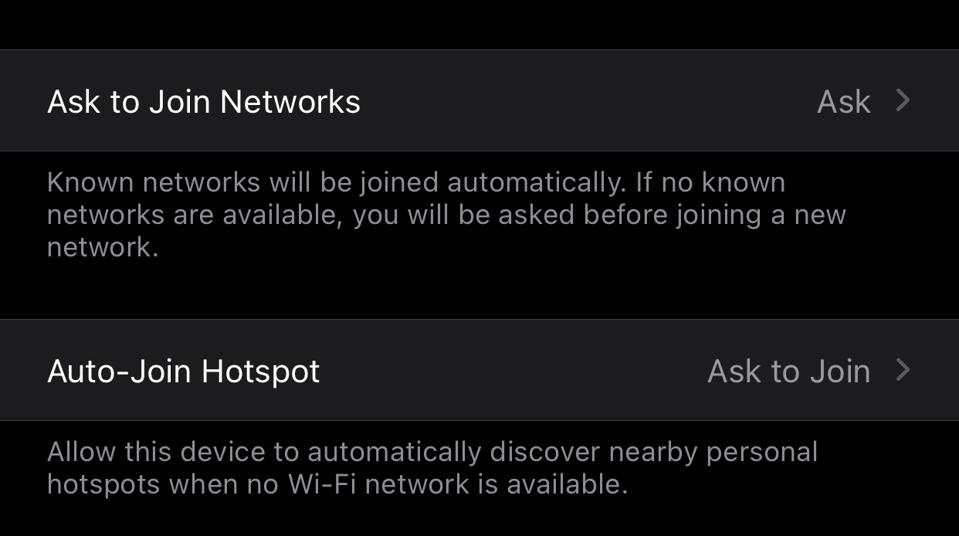
Settings / Wi-Fi
Apple iOS 14
Much more importantly, you should click on the blue-circled “i” next to any public network you connect to, and disable the “Auto-Join” option. You don’t need to click on “Forget This Network,” but you can do that if you’re unlikely to be back. This way you control where and when your iPhone connects. This will prevent you connecting to a coffee shop’s Wi-Fi when you’re in a bar—or sitting in an aisle seat at 35,000 feet.
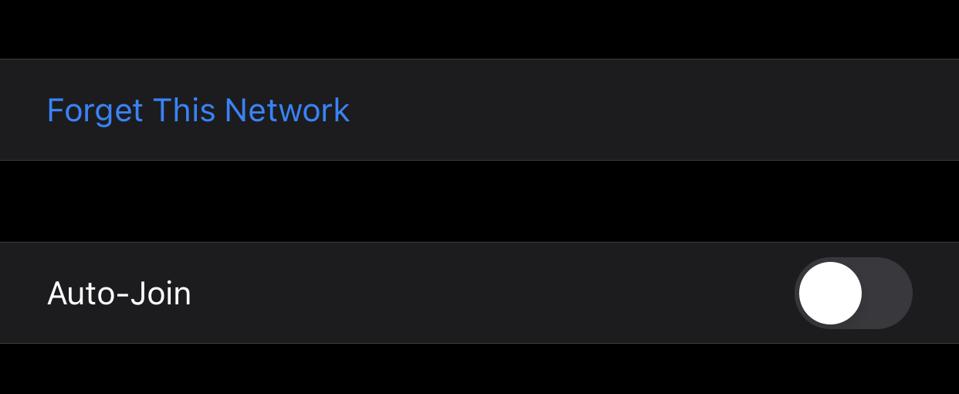
Settings / Wi-Fi
Apple iOS 14
If you do these two things—deselect auto-join for any public network you connect to and use a reputable VPN when you must use public Wi-Fi, then you will have taken sensible measures to keep your device protected. That said, prudent security advice is to avoid public Wi-Fi altogether. If you do, though, the FBI warns, “make sure to confirm the name of the network and the exact login procedures. Your goal is to avoid accidentally connecting to a fraudster’s Wi-Fi that they are trying to make look legit.”