
It’s often hard to make a decision on what framework to learn when there are many options to choose from. In the Machine Learning spectrum, we have multiple frameworks that compete against each other claiming to have better speed, better scalability, usability etc.
It’s obvious that certain things can only be done with certain frameworks, say if speed is your utmost concern then you should choose a framework that delivers the best speed. However, all these thoughts can be put aside if you just wish to start with something which is what this tutorial is about.

In this article, we will focus on PyTorch, one of the most popular Deep learning frameworks. We will learn to build a simple Linear Regression model using PyTorch with a classic example.
PyTorch Overview
PyTorch is a collection of machine learning libraries for Python built on top of the Torch library.It is widely popular for its applications in Deep Learning and Natural Language Processing.PyTorch also comes with a support for CUDA which enables it to use the computing resources of a GPU making it faster.

Machine Learning With PyTorch
We will now implement Simple Linear Regression using PyTorch.
Let us consider one of the simplest examples of linear regression, Experience vs Salary. We will train a regression model with a given set of observations of experiences and respective salaries and then try to predict salaries for a new set of experiences.
You can create your own dataset of random numbers or you can also download the same sample here.
Installing PyTorch
Before we begin to code , make sure you have the PyTorch module installed. To install PyTorch simply type the below command in your terminal.
pip3 install torch
Note:
If you are installing in a virtual environment make sure to activate it. For those who are using the Anaconda distribution, use <code>conda activate</code> command to activate the virtual environment.
Importing the libraries
We will start by importing all the important packages for this example.
#Importing necessary Librariesimport pandas as pdimport torchimport torch.nn as nnimport numpy as npimport matplotlib.pyplot as plt from sklearn.model_selection import train_test_split
Importing the data
We can now load our dataset into a Pandas dataframe with the following code block.
#Loading the datasetdata = pd.read_excel("exp_vs_sal.xlsx")
Visualizing the data
We will look at a simple scatter plot of the given data. The below line of code will generate a simple scatter plot.
#Plotting the Datasetdata.plot(kind = 'scatter', x = 'Experience', y = 'Salary')
Output:
We can clearly see a linear relation between the salary and experience from the above graph.We will move on creating a linear regressor.
Splitting The Datasets Into Training And Test Sets
The code block below will split the dataset into a training set and a test set. We will train the regressor with the training set data and will test its performance on the test set data.
#Splitting the dataset into training and testing datasettrain, test = train_test_split(data, test_size = 0.2)
Converting The Data Into Tensors
PyTorch uses tensors for computation instead of plain matrices.If you are wondering what the differences are and interested in knowing try reading this. Otherwise just know that tensors are more dynamic. So we need to convert our data into tensors. Before we convert, we need to pack each input or element in a list. Also for y(Salary) we should convert to type float as shown in the following code blocks.
#Converting training data into tensors for PytorchX_train = torch.Tensor([[x] for x in list(train.Experience)])y_train = torch.torch.FloatTensor([[x] for x in list(train.Salary)])#Converting test data into tensors for PytorchX_test = torch.Tensor([[x] for x in list(test.Experience)])
This is what the new data will look like :
Creating a Linear Regressor
We have prepared out data, now it’s time to build the regressor.We will build a custom regressor by defining a class that inherits the Module Class of PyTorch. This practice will allow us to build a more custom regressor for the problem.
1.class LinearRegression(nn.Module):
2. def __init__(self, in_size, out_size):
3. super().__init__()
4. self.lin = nn.Linear(in_features = in_size, out_features = out_size)
5. def forward(self, X): pred = self.lin(X) return(pred)
Let’s look at the line by line explanation below:
- Defining a class called LinearRegression that inherits PyTorch’s nn.Module class.
- Creating the init method for constructor. This function is invoked when an object is created for the class LinearRegression.
- Initializing the constructor of the parent class i,e nn.Module
- Creating object for PyTorch’s Linear class with parameters in_features and out_features. These parameters are the number of inputs and outputs at a time to the regressor.
- Defining the forward function for passing the inputs to the regressor object initialized by the constructor.The method will return the predicted values for the tensores that are passed as arguments.
Getting Parameters from the model
Since we are working on linear regression, we are trying to plot a best fitting line that passes through the points we saw in the scatter plot a while ago. To plot this line we need the parameters that are returned by the regressor. So we define a method for getting the parameter values from the tensor objects returned by model.parameters() method where model is the object for the class Linear Regression that we will define soon.
To achieve this we will first unpack the tensor objects returned by the model.parameters() method into w and b as shown below.
#Unpacking the parameters[w,b] = model.parameters()
After unpacking the tensor objects, we will define a method to return the tensor objects as values(python numericals) when called.
#A method for getting the parameter values from the tensor objectdef get_parameters(): return(w[0][0].item(), b[0].item())
Plotting the model
We will now define a simple method for plotting the regression line.
#A method for plotting the regressordef plot_model(name): plt.title(name) plt.xlabel('Experience') plt.ylabel('Salary') w1, b1 = get_parameters() X1 = np.array([-15, 15]) Y1 = w1 * X1 + b1 plt.plot(X1, Y1, 'g') plt.scatter(X_train,y_train) plt.show()
The above function when called will get the parameters from the model and plot a regression line over the scattered data points.
Setting random seed
If you are familiar with sklearn then you will obviously know the random_sate parameter or if you are R user you would know seed method, both of these have the same functionality of providing reproducibility of regression. That is for a particular value of seed the regressor will always return the exact same results.
# Setting the seed or random_state for reproducibilitytorch.manual_seed(1)
Initializing the regressor
Finally we create an object for the regressor we defined. The arguments passed here are the in_features(in_size) and out_features(out_size) respectively.
#Initializing the Linear modelmodel = LinearRegression(1 , 1)
The arguments mean that the regressor will take one input and return one output at a time.
With the below code we will print the values of the initial parameters set by the regressor. You will see that the model.parameters() method returns tensor objects. (To only get the value we use the item() method as we defined earlier in the get_parameters() method )
#Printing the initial model parametersprint(list(model.parameters()))
Output:
[Parameter containing:
tensor([[0.5153]], requires_grad=True), Parameter containing:
tensor([-0.4414], requires_grad=True)]
Plotting the regression with initial parameters
#Plotting the regression with initial weight and biasplot_model("Initial Model Plot")
Output:
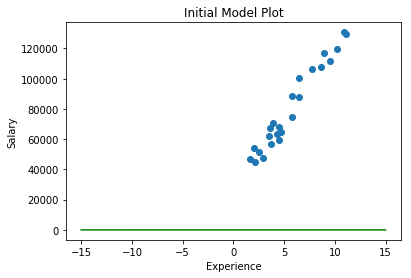
As you can see above that the green line is close to zero.This is because the initial parameters we so close to zero.

Initializing the loss function and optimizer for the regressor
We will now provide a loss function and an optimizer for out regressor. We will use Mean Squared Error for loss calculation and Stochastic Gradient Descent algorithm for optimizing and minimizing the error
#Initializing the loss function as Mean Squared Errorloss_fun = nn.MSELoss()#Initializing the optimizer as Stochastic Gradient Descent with the model parameters and learning rate 0.01optimizer = torch.optim.SGD(model.parameters(), lr = 0.01)
Training the model
Finally it’s time to train our model with the training data we saved earlier. We will use a for loop to iterate through epochs or cycles of training. We will also store the losses during each cycle in a list.
# Training the model
1.epochs = 100
2.losses = []
3.for i in range(epochs):
4. y_pred = model.forward(X_train)
5. loss = loss_fun(y_pred, y_train)
6. print("@epoch : ", i, " #Loss : ", loss.item())
7. losses.append(loss)
8. optimizer.zero_grad()
9. loss.backward()
10. optimizer.step()
Let’s look at each line.
- Define the number of epochs or cycles of training.Here the training will run a cycle of 50 time each time updating its weights and trying to minimize the error
- A list for storing the losses at each cycle/epoch
- A for loop to iterate over the epochs
- Feeding the regressor with training data X_train
- Passing the predicted value of X_train and actual observation to the loss function to calculate the loss
- Printing the epoch and loss
- Saving the loss into a list
- Setting the optimizer to zero gradient before backward propagation. This will help the SGD in moving the right direction of slope
- Backpassing the losses generated at an epoch
- Calling the step method performs a parameter update based on the current gradient and proceeds
Output:
Visualizing the loss
#Visualizing the loss curveplt.plot(range(epochs), losses)
Output:

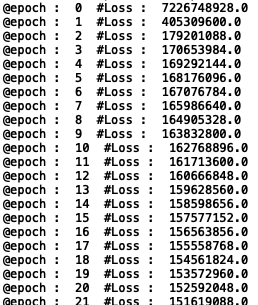
From the above image image we can see a considerable decrease in loss from epochs 0 to 3. From the 3rd or 4th epochs the loss keeps almost steady. This means the model cannot further optimize itself. Now we will jump ahead and see how out trained model drew the regression line.
Visualizing the regressor after training
#Visualizing the trained regressorplot_model("Trained Model")
Output:

From the above image, we can see that the regression line almost passes through or is closer to most of the data points. Good job. Our regressor is now officially qualified to predict Salaries for new Experiences.
Predicting Salaries for test data
#Predicting for X_testy_pred_test = model.forward(X_test)
Comparing Actual observations and Predictions
#Converting predictions from tensor objects into a list
y_pred_test = [y_pred_test[x].item() for x in range(len(y_pred_test))]# Comparing Actual and predicted valuesdf = {}df['Actual Observation'] = y_testdf['Predicted Salary'] = y_pred_testdf = pd.DataFrame(df)print(df)
Output:

#Visualizing Actual and predicted valuesdf.plot()
Output:

We can see how close the predictions are to the actual observations.Great Job !! You have created your first ever regressor in PyTorch.